Announcement

Collapse
No announcement yet.

Game's Not Working/Link Broken

Collapse
This is a sticky topic.
X
X
 
  • Filter
  • Time
  • Show
Clear All
new posts

  • Cannot Display Page

    Having a few probs. Don't know if it's my computer (it's on an internal server system at work) or not. Sometimes when I click on buttons (ie post reply below) nothing happens. A lot of the time when I am reading the forum pages & I click for the next page I get a lot of Unable to display this page etc.
    I don't think it can be the site clogging up as at the mo it says there are only 8 people logged on. Is there anything I can do? (I am using IE7).
    Life is long and complicated. Don't make it harder!
    Love and thoughts are with everyone who is going through a rough time.

    Comment


    • There might be a Page Cannot Be Displayed message when the forum is down, but this happens very rarely.
      If you get this message rather often, there might be a problem at your end. I'm using IE 7, too, and don't experience this problem.
      What you could try for the moment is to empty your cache, delete the cookies, and if possible run an adware/malware scan.
      Maybe somebody else has an additional idea on this one.

      It is a known problem that the EDIT button, the QUOTE button and the SPOILER button sometimes don't work unless you refresh the page. This happens sometimes to most members.

      Comment


      • Thanks very much I will try that
        Life is long and complicated. Don't make it harder!
        Love and thoughts are with everyone who is going through a rough time.

        Comment


        • Please let us know if that fixes the problem for you

          Comment


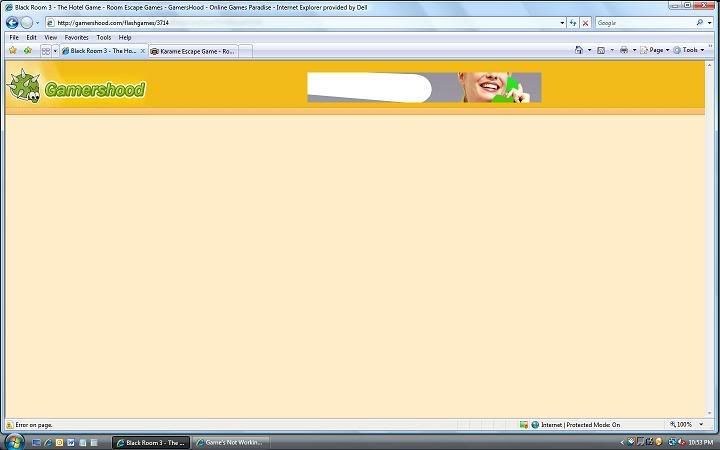
          • I've noticed today that when I'm going to play a lot of the games, the page will load, but there's no link or anything. I've tried to find anything like a news update for the site, but I couldn't (maybe I'm not looking hard enough), and it seems that only about 25% of the games are actually there. I'm not too sure if it's just me or my computer or other people are actually having this problem or the site is rearranging or something, but I'd like to know what it is...

            Comment


            • Hmmm, I'm sorry but I don't really understand what you mean. Where is no link? Can you give us some examples?

              Comment


              • Here's an image.

                Comment


                • Hmm. Have you tried using another browser like Firefox? Or seeing if you need to update your computer? It's worth a try. If neither of those things work, maybe Mistery or someone else who is also good with these kinds of things will have another idea.

                  Comment


                  • Hmmm, that's indeed very strange
                    If I open the same page of your screenshot, I see this:

                    Click image for larger version

Name:	3714.JPG
Views:	1
Size:	52.3 KB
ID:	1684740

                    Therefore the problem seems to be at your end.
                    I'm not sure what the reason is, but as Escape said, you could try another browser, update your browser, delete your history and cookies, run a malware scan on your pc.
                    At this very moment I have no other ideas.

                    Comment


                    • It seems to have sorted itself out overnight. I don't know what the problem was. I didn't do anything to fix it, and my computer didn't run any updates... strange things. Ah well, at least I can play the games I've missed in my absence from the internet now.

                      Comment


                      • I'm glad to hear that it fixed itself somehow
                        Enjoy the games!

                        Comment


                        • game not working

                          "Hako Robo Room "
                          on the front page of gamershood there is the "Hako Robo Room " game but when i click the link it re directs me to the page which should have another link to open a window to the actual game but usually where it says "play" there is not button / link to click .
                          could you send me the link for the game?
                          thanks
                          french translation : " ... i have rabbits.... in my trousers"
                          lmao top gear ledgends

                          Comment


                          • Hi Tarumi, I've just checked and the link from gamershood.com to the game Hako Robo Room works for me. The game loads immediately, and there is a PLAY button aswell.
                            The link is http://sky.zero.ad.jp/~zad45932/hako.html

                            To what page do you get when you click the link?

                            Comment


                            • it directs me to this page
                              This is a room escape game in Japanese. Gather items and use them in order to escape.

                              but there is no play button =S
                              french translation : " ... i have rabbits.... in my trousers"
                              lmao top gear ledgends

                              Comment


                              • Just to make sure that I've understood you correctly. You see this page, but without the PLAY button underneath the image?

                                Click image for larger version

Name:	Hako.JPG
Views:	1
Size:	11.5 KB
ID:	1684877

                                If this is the case, the problem seems to be at your end.
                                Delete your cookies, and the history of your browser. Then try again (refresh the page).
                                If it still doesn't help, you might want to consider to restart your pc, and check if it's working. Let me know if these suggestions help

                                How to delete cookies and history in your browser:
                                Originally posted by Mistery
                                If you use Internet Explorer:
                                Go to Tools -> "Internet Options"


                                or


                                Click "delete cookies" AND "delete files" AND "clear history"

                                Comment

                                Working...
                                X